Bizum Payments

This document apply to the following country:
| Spain |
|---|
Accept payments through Bizum, the leading mobile payment method in Spain. The buyer pays using only the mobile phone number linked to their bank account, no card details required. The buyer approves the payment in their banking app (biometrics / PIN).
This guide walks you through creating a payment intent, submitting the payment, and confirming the result through a single Web Checkout API integration.
How it works
Use Bizum when you want to offer a fast, local mobile payment method to buyers in Spain who pay without a card. Key characteristics:
- Instant: confirmation in seconds.
- No card: the buyer is identified by their phone number.
- Bank app authentication: final approval is done by the buyer in their banking app (biometrics / PIN).
- APM (Alternative Payment Method): no installments, no card/3DS flow.
- Asynchronous: starts the operation and may return pending. Always confirm via polling/webhook before releasing the order.
The end-to-end flow involves the buyer, your frontend, your backend, and the Getnet Web Checkout API:
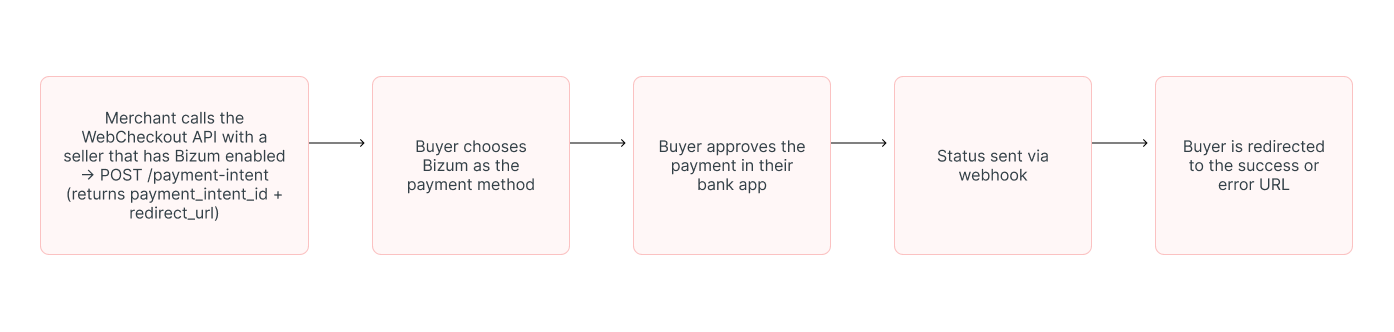
notification.url, or redirect to success_url, error_url.Before you start
Make sure the following are in place before integrating:
- Payments are in EUR and the market is ES.
- Generate your token following the Authentication document.
Test Phone Number
Use the following phone number for testing Bizum transactions in the test environment:
700 000 000This phone number will allow you to complete the Bizum payment flow in the test environment without requiring an actual Bizum account.
Test Amounts
Different transaction amounts will simulate different payment outcomes in the test environment. Use the table below to test various scenarios:
| Amount | Outcome | Description |
|---|---|---|
| Less than €5 | Payment confirmed | Transaction is successful and immediately approved |
| €5 to €10 | Payment confirmed | Transaction is successful with normal processing |
| €10 to €500 | Payment confirmed | Transaction is successful for standard amounts |
| More than €500 | Payment refused | Transaction is declined to simulate high-value rejections |
Note: These test scenarios are only available in the test environment. Production transactions will be processed normally based on the customer's actual Bizum account status and balance.

Step 1: Create the payment intent
payment_intent_id and a redirect_url.| Endpoint |
|---|
POST /payment-intent |
| Field | Type | Description | Example |
|---|---|---|---|
payment.currency | string | Currency code. | EUR |
payment.amount | integer | Purchase amount in integer format, where the last 2 digits represent the cents. For countries where cents do not apply, fill in the amount with 2 zeros to the right. | 5000 |
customer.customer_id | String | Recommend using the customer's document number, only letters and numbers, without any special characters, separators or spaces. | 12345678912 |
customer.first_name | String | Customer's first name. | John |
customer.last_name | String | Customer's last name. | Doe Smith |
customer.name | String | Customer's full name. | John Doe Smith |
customer.email | String | Customer's email address. | customer@email.com.br |
customer.document_type | String | Type of the document used to identify the customer. | DNI |
customer.document_number | String | Document number used to identify the customer. | 12345678Z |
customer.billing_address.street | String | Name of a street. | Calle Gran Via |
customer.billing_address.number | String | Number that identifies the position of a building on a street. | 1000 |
customer.billing_address.country | String | Country code. | ES |
customer.billing_address.postal_code | String | Postal or ZIP code. | 90230060 |
| Field | Type | Description | Example |
|---|---|---|---|
configurations.3ds | boolean | Controls 3D Secure authentication. Does not apply to Bizum. | true or false |
configurations.preauthorization | boolean | Indicates if the payment is a pre-authorization. | true or false |
configurations.card_verification | boolean | Indicates if this is a card verification flow. Does not apply to Bizum. | true or false |
configurations.success_url | string | Redirect URL in case of successful payment. | https://www.mystore.com/checkout/success |
configurations.error_url | string | Redirect URL in case of an error during payment. | https://www.mystore.com/checkout/error |
soft_descriptor | string | Payment description that appears on the customer's receipt | Tienda ES |
expires_at | string | Payment intent expiration. | 3d4h15m |
Field filling rules:
- The
expires_atfield accepts a duration value (for example, 15m, 2h, 7d, or 1d12h30m). This duration is applied regardless of the merchant's timezone. The expiration timestamp returned by the API is always formatted in GMT+0 (UTC). If no value is provided, the payment intent does not expire. - When
success_urlanderror_urlis provided in the payment intent request, it will overrides the value configured in the seller's technical configuration. - Spain only the value on the
document_typefield, must beDNI,INEorpassport.
Example of request
{
  "mode": "instant",
  "order_id": "ORDER_BIZUM_ES_0001",
  "configurations": {
    "3ds": false,
    "preauthorization": false,
    "card_verification": false,
    "success_url": "https://www.mystore.com/checkout/success",
    "error_url": "https://www.mystore.com/checkout/error"
  },
  "payment": {
    "currency": "EUR",
    "amount": 5000
  },
  "product": [
    {
      "product_type": "service",
      "title": "Plan Pro",
      "description": "Suscripcion 1 mes",
      "value": 5000,
      "quantity": 1
    }
  ],
  "customer": {
    "customer_id": "customer_es_005",
    "first_name": "Jose",
    "last_name": "Garcia",
    "name": "Jose Garcia",
    "email": "customer@email.com",
    "document_type": "DNI",
    "document_number": "12345678Z",
    "phone_number": "34600123456",
    "checked_email": true,
    "billing_address": {
      "street": "Calle Gran Via",
      "number": "28",
      "complement": "3o B",
      "district": "Centro",
      "city": "Madrid",
      "state": "Madrid",
      "country": "ES",
      "postal_code": "28013"
    }
  },
  "soft_descriptor": "Tienda ES",
  "expires_at": "1h"
}{
"mode": "instant",
"order_id": "ORDER_BIZUM_ES_0001",
"configurations": {
"3ds": false,
"preauthorization": false,
"card_verification": false,
"success_url": "https://www.mystore.com/checkout/success",
"error_url": "https://www.mystore.com/checkout/error"
},
"payment": {
"currency": "EUR",
"amount": 5000
},
"product": [
{
"product_type": "service",
"title": "Plan Pro",
"description": "Suscripcion 1 mes",
"value": 5000,
"quantity": 1
}
],
"customer": {
"customer_id": "customer_es_005",
"first_name": "Jose",
"last_name": "Garcia",
"name": "Jose Garcia",
"email": "customer@email.com",
"document_type": "DNI",
"document_number": "12345678Z",
"phone_number": "34600123456",
"checked_email": true,
"billing_address": {
"street": "Calle Gran Via",
"number": "28",
"complement": "3o B",
"district": "Centro",
"city": "Madrid",
"state": "Madrid",
"country": "ES",
"postal_code": "28013"
}
},
"soft_descriptor": "Tienda ES",
"expires_at": "1h"
}Example of 201 response
{
  "payment_intent_id": "ee0b7dd5-92da-4ef4-ad3b-0ba369ad0efe",
  "trade_name": "Minha Loja ES",
  "redirect_url": "https://checkout.getnet.com/es/ee0b7dd5-92da-4ef4-ad3b-0ba369ad0efe",
  "expires_at": "2026-07-02T19:30:00Z"
}{
"payment_intent_id": "ee0b7dd5-92da-4ef4-ad3b-0ba369ad0efe",
"trade_name": "Minha Loja ES",
"redirect_url": "https://checkout.getnet.com/es/ee0b7dd5-92da-4ef4-ad3b-0ba369ad0efe",
"expires_at": "2026-07-02T19:30:00Z"
}Step 2: Redirect and submit the payment
redirect_url, or show the embedded checkout screen where they choose Bizum.Step 3: Buyer approves in the bank app
The buyer confirms the payment in their banking app (biometrics / PIN). This step happens outside your integration.
Step 4: Confirm the result
- Webhook: sent to the
notification.url. - Redirect: to
success_urlorerror_url.
Example of Approved webhook response
{
  "payment_intent_id": "ee0b7dd5-92da-4ef4-ad3b-0ba369ad0efe",
  "checkout_id": "5ab15d1e-ea8b-4560-84d2-fb3d02179537",
  "order_id": "ORDER_BIZUM_ES_0001",
  "mode": "instant",
  "seller": {
    "id": "716d899e-9091-4577-a12f-8a77ec4d1e0b",
    "trade_name": "GetNet Shop",
    "merchant_document": "00000000000",
    "settings": { "notification_url_configured": true }
  },
  "customer": {
    "customer_id": "customer_es_005",
    "name": "Jose Garcia",
    "email": "customer@email.com",
    "document_type": "dni",
    "document_number": "12345678Z"
  },
  "payment": {
    "method": "bizum",
    "amount": 5000,
    "currency": "EUR",
    "result": {
      "payment_id": "772f951479c6514b1d9c4e8fd4808fe6",
      "status": "Authorized",
      "authorization_code": "999999",
      "transaction_datetime": "2026-07-08T12:00:00.000Z"
    }
  },
  "created_at": "2026-07-08T11:58:00.000Z",
  "updated_at": "2026-07-08T12:00:00.000Z"
}{
"payment_intent_id": "ee0b7dd5-92da-4ef4-ad3b-0ba369ad0efe",
"checkout_id": "5ab15d1e-ea8b-4560-84d2-fb3d02179537",
"order_id": "ORDER_BIZUM_ES_0001",
"mode": "instant",
"seller": {
"id": "716d899e-9091-4577-a12f-8a77ec4d1e0b",
"trade_name": "GetNet Shop",
"merchant_document": "00000000000",
"settings": { "notification_url_configured": true }
},
"customer": {
"customer_id": "customer_es_005",
"name": "Jose Garcia",
"email": "customer@email.com",
"document_type": "dni",
"document_number": "12345678Z"
},
"payment": {
"method": "bizum",
"amount": 5000,
"currency": "EUR",
"result": {
"payment_id": "772f951479c6514b1d9c4e8fd4808fe6",
"status": "Authorized",
"authorization_code": "999999",
"transaction_datetime": "2026-07-08T12:00:00.000Z"
}
},
"created_at": "2026-07-08T11:58:00.000Z",
"updated_at": "2026-07-08T12:00:00.000Z"
}Example of Denied webhook response
{
  "payment_intent_id": "ee0b7dd5-92da-4ef4-ad3b-0ba369ad0efe",
  "checkout_id": "5ab15d1e-ea8b-4560-84d2-fb3d02179537",
  "order_id": "ORDER_BIZUM_ES_0001",
  "mode": "instant",
  "payment": {
    "method": "bizum",
    "amount": 5000,
    "currency": "EUR",
    "result": {
      "payment_id": "772f951479c6514b1d9c4e8fd4808fe6",
      "status": "Denied",
      "transaction_datetime": "2026-07-08T12:02:00.000Z",
      "return_message": "Payment not authorized by the customer's bank"
    }
  },
  "created_at": "2026-07-08T11:58:00.000Z",
  "updated_at": "2026-07-08T12:02:00.000Z"
}{
"payment_intent_id": "ee0b7dd5-92da-4ef4-ad3b-0ba369ad0efe",
"checkout_id": "5ab15d1e-ea8b-4560-84d2-fb3d02179537",
"order_id": "ORDER_BIZUM_ES_0001",
"mode": "instant",
"payment": {
"method": "bizum",
"amount": 5000,
"currency": "EUR",
"result": {
"payment_id": "772f951479c6514b1d9c4e8fd4808fe6",
"status": "Denied",
"transaction_datetime": "2026-07-08T12:02:00.000Z",
"return_message": "Payment not authorized by the customer's bank"
}
},
"created_at": "2026-07-08T11:58:00.000Z",
"updated_at": "2026-07-08T12:02:00.000Z"
}On this page